(function () {
try {
// AQ-r2 (2026-06-09): respect the explicit-denial sentinel
// written by cookie-consent-harden.js writeATR() on any
// marketing-axis denial (payload.marketing === false; cycle-3 F1).
// Without this gate, the next page navigation re-creates
// gmx_first_touch from the current URL+referrer+utm_*+click_ids,
// silently undoing the reject-all deletion (sweep finding #1).
// The sentinel is cleared the moment the visitor grants
// marketing in the banner (analytics-only grant does NOT
// clear), restoring the writer path on the very next
// page load. Page-cache-safe: the sentinel is a
// browser-resident cookie checked in the inline script, so
// varnish/breeze-served HTML still hits this gate.
if (/(?:^|;\s*)gmx_consent_denied=1(?:;|$)/.test(document.cookie || '')) return;
var CLICK_IDS = ['gclid','fbclid','msclkid','ttclid','wbraid','gbraid','li_fat_id'];
var qs = new URLSearchParams(window.location.search);
var urlClickIdKey = null;
for (var i = 0; i < CLICK_IDS.length; i++) {
if (qs.get(CLICK_IDS[i])) { urlClickIdKey = CLICK_IDS[i]; break; }
}// Parse existing cookie.
var existing = null;
var match = document.cookie.match(/(?:^|;\s*)gmx_first_touch=([^;]+)/);
if (match) {
try { existing = JSON.parse(decodeURIComponent(match[1])); } catch (e) { existing = null; }
}// GWP-273 — referrer-enrichment branch.
// Keep existing unless either (a) URL carries a new click id
// the stored payload lacks (paid click is a higher-value
// signal and upgrades direct/organic), OR (b) the stored
// payload has empty referrer AND the current document.referrer
// is non-empty + external (Safari/ITP/policy-quirk catch:
// first-hit may have missed the referrer; later same-session
// page-loads can recover it).
var existingHasRef = !!(existing && existing.referrer && existing.referrer !== '');
var docRef = document.referrer || '';
var refHost = '';
if (docRef) {
try {
refHost = new URL(docRef).hostname.replace(/^www\./, '').toLowerCase();
} catch (e) { refHost = ''; }
}
var ownHost = (location.host || '').replace(/^www\./, '').toLowerCase();
var currentExternalRef = !!(refHost && refHost !== ownHost);
var canEnrichRef = !!existing && !existingHasRef && currentExternalRef;if (existing) {
if (!urlClickIdKey && !canEnrichRef) return;
if (urlClickIdKey && existing[urlClickIdKey] && !canEnrichRef) return;
}var utm_keys = [
'utm_source','utm_medium','utm_campaign','utm_content','utm_term',
'utm_adgroup','utm_matchtype','utm_network','utm_device','utm_placement'
];
// GWP-273 — merge-preserving base. When enriching an existing
// payload, retain its landing_url + ts + prior click ids /
// utms; only overlay referrer (and any click id appended below
// via the forEach). Branches with/without urlClickIdKey were
// collapsed — both produced the identical Object.assign — the
// click id is added uniformly later.
//
// GWP-273 design choice: "latest external referrer wins" —
// accepted edge case where a user opens a new external tab
// post-empty-first-touch and returns; low-volume, simple, no
// sentinel flag needed.
var data;
if (existing && canEnrichRef) {
data = Object.assign({}, existing, { referrer: docRef });
} else {
data = { landing_url: window.location.href, referrer: docRef, ts: Date.now() };
}
utm_keys.concat(CLICK_IDS).forEach(function (k) {
var v = qs.get(k);
if (v) data[k] = v;
});
var encoded = encodeURIComponent(JSON.stringify(data));
if (encoded.length > 3800) return;
var expires = new Date(Date.now() + 90 * 864e5).toUTCString(); // GWP-143 C1: match Google Ads 90-day attribution window
var secure = window.location.protocol === 'https:' ? '; Secure' : '';
document.cookie = 'gmx_first_touch=' + encoded + '; Path=/; Expires=' + expires + '; SameSite=Lax' + secure;
} catch (e) {}
})();
var breeze_prefetch = {"local_url":"https://gomixapp.com","ignore_remote_prefetch":"1","ignore_list":["/cart/","/checkout/","/my-account/","https://gomixapp.co.il/(.)/u05d4u05d8u05d5u05e4u05e1-u05e0u05e9u05dcu05d7-u05d1u05d4u05e6u05dcu05d7u05d4/","wp-admin","wp-login.php"]};
//# sourceURL=breeze-prefetch-js-extra
var woocommerce_params = {"ajax_url":"/wp-admin/admin-ajax.php","wc_ajax_url":"/?wc-ajax=%%endpoint%%","i18n_password_show":"Show password","i18n_password_hide":"Hide password"};
//# sourceURL=woocommerce-js-extra
var dataLayer_content = {"visitorLoginState":"logged-out","visitorType":"visitor-logged-out","visitorEmail":"","visitorEmailHash":"","visitorRegistrationDate":"","visitorUsername":"","visitorIP":"85.208.96.197","pagePostType":"page","pagePostType2":"single-page","deviceType":"bot","deviceManufacturer":"","deviceModel":"","customerTotalOrders":0,"customerTotalOrderValue":0,"customerFirstName":"","customerLastName":"","customerBillingFirstName":"","customerBillingLastName":"","customerBillingCompany":"","customerBillingAddress1":"","customerBillingAddress2":"","customerBillingCity":"","customerBillingState":"","customerBillingPostcode":"","customerBillingCountry":"","customerBillingEmail":"","customerBillingEmailHash":"","customerBillingPhone":"","customerShippingFirstName":"","customerShippingLastName":"","customerShippingCompany":"","customerShippingAddress1":"","customerShippingAddress2":"","customerShippingCity":"","customerShippingState":"","customerShippingPostcode":"","customerShippingCountry":"","cartContent":{"totals":{"applied_coupons":[],"discount_total":0,"subtotal":0,"total":0},"items":[]}};
dataLayer.push( dataLayer_content );
Digital PDF signing turns every signature process into something simple, fast, and secure – all at the click of a button, without leaving your chair.
Electronic PDF Signature: Peace of Mind and Security
Signatures protected by advanced encryption, legally recognized under the regulations of the Privacy Protection Authority. Instant access to signed documents from anywhere, with full digital verification for every signature.
Secure PDF Signing Process: Advanced Technology and Convenience
PDF agreements with a verified digital certificate, precise tracking of every change, and a simple interface that even a new employee can master within minutes.
Remote signing of contracts, medical approvals, and government forms – security, speed, and accessibility. The GoMixApp solution secures the entire signing process for any organization.
Electronic PDF signatures are legally recognized and secured with advanced encryption. Every signature on a PDF document receives full documentation and meets regulatory requirements. You get instant access to signed documents from any device. In addition, our solution eliminates the need for paper entirely.
All Forms in One Place
All signed forms arrive directly in your email, making the signing process convenient, simple, and organized
Choose from a variety of fields for every need – checkboxes for selection and file attachment, multiple tabs to organize information and capture large amounts of data in a single form.
ISO-Standard Security
High-level document security in compliance with the ISO 27001 information-security standard, including the international AATL digital-signature standard
Compatibility with All Devices
Sign in any time and from anywhere using GoMixApp from your mobile, tablet, or personal computer.
Drop & Drag Content Editor
Content editor that is user-friendly and gives you independent control.
Cloud Data Organization and Analytics
Personalized email notifications, view your form data from any device with customized dashboards to manage your work.
How Does Online PDF Signing Work?
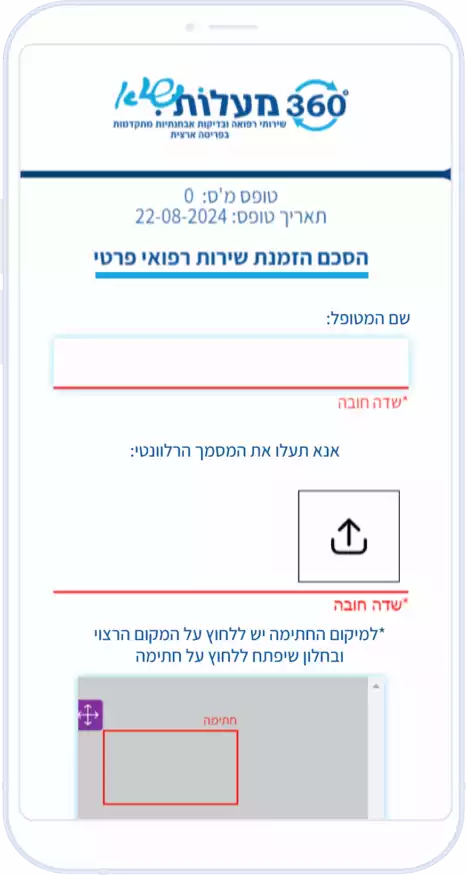
You send your requirements, and we create a digital PDF form.
The GoMixApp team builds the perfect digital form for you, or converts an existing form into a digital version. This includes design, implementation, image uploads, and a digital business seal.
Send the form to clients at the click of a button
Choose the form, share it with one click, and your clients sign easily from any device and from anywhere – without downloading any software.
The GoMixApp document-signing app supports PDF signing and full digital sealing. Every business digital seal is documented with a timestamp for legal validity.
Signed forms reach you quickly and easily
No more paper forms! Once the customer signs the form, the signed form arrives directly in your email
Customer Recommendations
Pinchas
Building committee, Ramla
Service:
★★★★★
Product:
★★★★★
Recommendation:
★★★★★
“With the holiday videos you absolutely nailed it – the residents were thrilled!”
Mor
Academic institution
Service:
★★★★★
Product:
★★★★★
Recommendation:
★★★★★
“The digital noticeboard looks amazing, and everything runs smoothly!”
Inbar Shmueli
Business owner
Service:
★★★★★
Product:
★★★★★
Recommendation:
★★★★★
“Personal and professional service, fast response, excellent product, very satisfied”
The Secure Way to Sign PDFs Online with a Protected Digital Signature
It is time to take your business to the next level. Remote PDF signing streamlines workflows and ensures smooth flow between departments. Our system offers tools for digital document signing, automatic backups, real-time digital tracking, and personal support – ensuring every form is signed securely and is accessible from anywhere. Create an online PDF form for digital signing by lawyers, HR managers, and more – all in one platform.
Over 300 companies have already chosen the secure signing solution from GoMixApp. If you have not yet moved to virtual signing – 2026 is the right time. Contact us and start signing documents digitally today.
Didn’t find the digital PDF signing form you were looking for? Contact us and we’ll be happy to help!
Already Collaborating With Us
High-quality photorealistic image of a smiling woman sitting in a bright modern coffee shop.
Key Takeaways
Electronic document signing enables secure identity verification that is legally binding.
Always save signed files in PDF/A format to ensure long-term archival validity.
Choose a recognized certificate provider to ensure compliance with eIDAS regulations and Israeli law.
Verify the validity of the digital signature before any use in an official or legal document.
Encrypting the document together with the signature prevents forgery and unauthorized changes to the content.
Frequently Asked Questions
How do you add a digital signature to a PDF file?
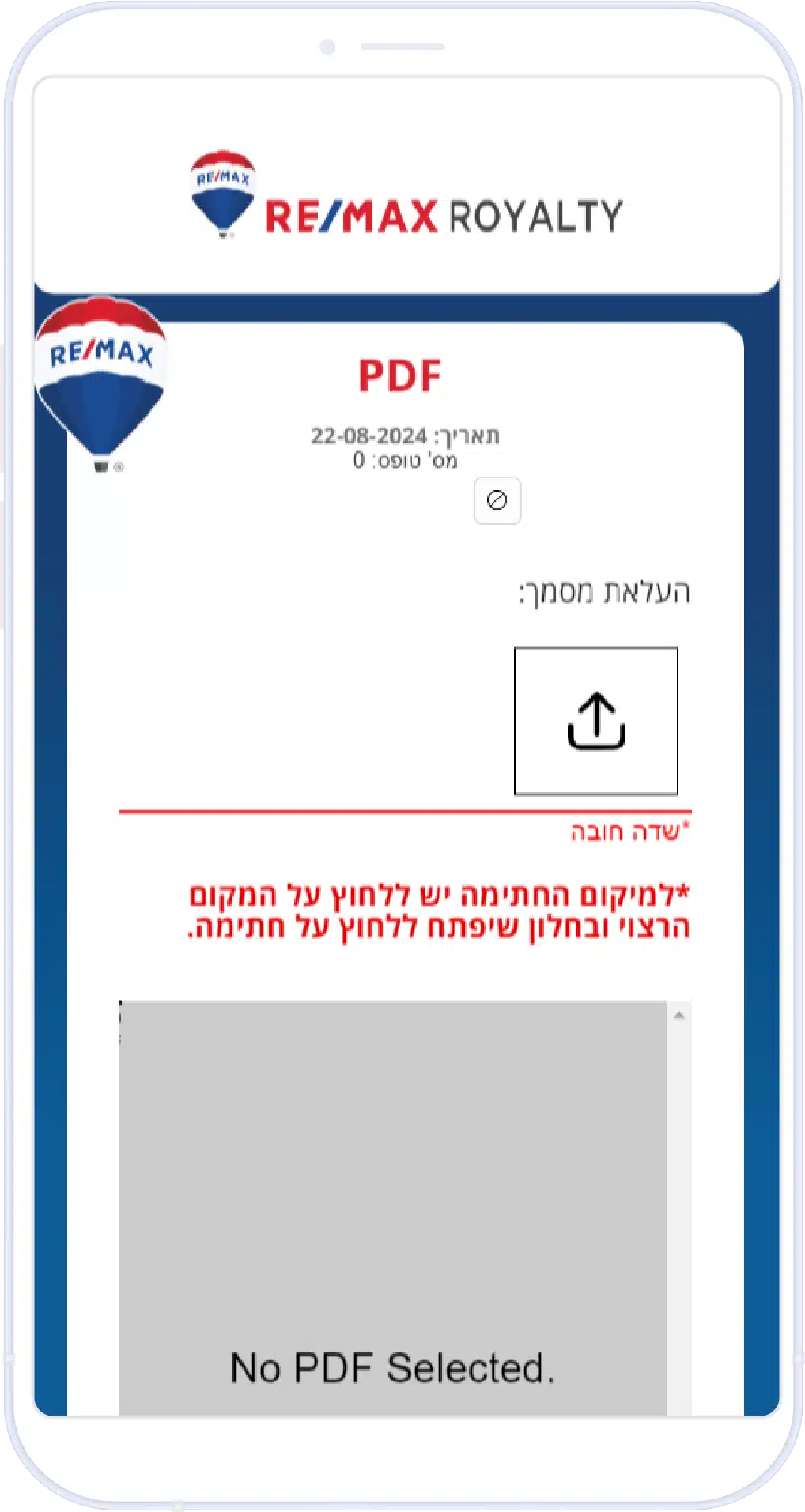
To add a digital PDF signature, upload the document to the GoMixApp platform, define a signature field, and send it to the client at the click of a button. The client signs digitally from any device, and the signed document arrives automatically with a digital certificate and identity verification.
Is an electronic PDF signature legally recognized in Israel?
Yes. An electronic PDF signature is legally recognized in Israel under the Electronic Signature Law, 5761-2001. The GoMixApp platform provides a digital certificate, timestamp, and digital verification for every signature – ensuring full legal validity.
How do you send a PDF file for electronic signature?
Upload the PDF file to the GoMixApp system, set up the required signature fields, and share it with the recipient via a direct link or email. The recipient signs electronically from any device without installing any software, and the signed document arrives in your mailbox immediately.
Can you sign a PDF for free?
There are free digital PDF signing options in basic tools, but they typically lack encryption, digital verification, and legal documentation. For businesses that require a fully legal signature with a digital certificate and audit trail, GoMixApp offers affordable plans with high value for every shekel.
What is the difference between an electronic signature and a digital signature?
An electronic signature is any digital sign indicating agreement, whereas a digital signature is a more advanced type based on encryption and a digital certificate. The digital signature provides stronger identity verification and higher legal validity – which is why it is recommended for business contracts and official documents.
In which fields is digital document signing common?
Digital document signing is common in real estate, law, healthcare, insurance companies, banking, and education. A document-signing app lets you have clients sign contracts, medical forms, lease agreements, and government documents – all from a single device.
Comparison of PDF Signing Methods: Digital, Manual, and Scanned
Feature
Digital PDF Signature
Manual / Traditional Signature
Scanned & Pasted Signature
Document Security & Verification
✓Advanced encryption and full verification
✗No digital protection for the document
✗Easy to forge with no protection
Speed of the Signing Process
✓Instant signing from anywhere
✗Requires printing and physical delivery
✗Long and cumbersome process
Legal Validity
✓Legally recognized in Israel and worldwide
✓Recognized but requires physical presence
✗Limited and questionable legal validity
Eco-Friendly
✓No printing, zero paper
✗High paper and resource consumption
✗Still requires printing and scanning
Document Management & Storage
✓Organized and accessible digital archive
✗Bulky and expensive physical storage
✗Disorganized files and poor quality
Business Suitability
✓Perfect for any business size
✗Limited to businesses with physical presence
✗Unprofessional and inefficient for business
In summary: Why choose the GoMixApp signing solution?
Digital document signing is no longer a privilege of large companies – it is the new standard for any business that wants to operate quickly, securely, and lawfully. We have seen how digital signing software combines advanced encryption, digital verification, timestamps, and full documentation – all of which turn every signature into a binding and protected document.
It is important to remember: choosing the right signing platform saves your business dozens of work hours each year, ensures regulatory compliance, and improves the customer experience. Over 300 Israeli companies have already adopted the GoMixApp solution and report a significant reduction in deal-closure times. Last updated: January 2026.
Want to start signing PDF documents digitally, securely, and paperlessly? Contact the GoMixApp team and we will tailor the perfect solution for your business.
var atrCookieNoticeSettings = {"cookieName":"atr_cookie_notice_consent","decisionCookieName":"atr_cookie_notice_consent_given","expiryDays":"365","autoHideDelay":"0","enableDebug":"","siteName":"GoMixApp","isPrivacyPage":"","privacyPolicyUrl":"https://gomixapp.com/privacy-policy/","privacyNoteText":"\ud83d\udca1 You can read this page while deciding about cookies","mode":"simple"};
//# sourceURL=atr-cookie-notice-simple-js-extra
var gmxConsent = {"strings":{"gmx_consent_banner_text":"We use cookies to improve your experience, analyze traffic and personalize content. You can accept all, reject non-essential, or choose individually.","gmx_consent_accept_all":"Accept all","gmx_consent_reject_all":"Reject all","gmx_consent_manage":"Manage","gmx_consent_privacy_link":"Privacy policy","gmx_consent_modal_title":"Cookie preferences","gmx_consent_modal_lede":"Choose which categories of cookies we may set. You can change this at any time via \"Cookie preferences\" in the footer.","gmx_consent_cat_necessary_ttl":"Strictly necessary","gmx_consent_cat_necessary_desc":"Login, cart, security, session. Required for the site to function. Cannot be disabled.","gmx_consent_cat_functional_ttl":"Functional","gmx_consent_cat_functional_desc":"Remembers language, region, accessibility-widget state.","gmx_consent_cat_analytics_ttl":"Analytics","gmx_consent_cat_analytics_desc":"Google Analytics (anonymized). Aggregate traffic and page-engagement data.","gmx_consent_cat_marketing_ttl":"Marketing","gmx_consent_cat_marketing_desc":"Google Ads, conversion tracking, remarketing. Used to measure ads and show relevant offers.","gmx_consent_save_prefs":"Save preferences","gmx_consent_footer_revisit":"Cookie preferences","gmx_consent_always_on":"Always on"},"atrCookie":"atr_cookie_notice_consent","atrFlag":"atr_cookie_notice_consent_given","privacyUrl":"https://gomixapp.com/privacy-policy/","gcmMap":{"analytics_storage":"analytics","ad_storage":"marketing","ad_user_data":"marketing","ad_personalization":"marketing"}};
//# sourceURL=gmx-cookie-consent-harden-js-extra
(function(){
function cleanUrl(url) {
// Strip query params embedded mid-path: /ID?params/file -> /ID/file
return url.replace(/\?[^\/]+\//g, '/');
}
function addWebPFallback(pic) {
if (pic.getAttribute('data-webp-fb')) return;
pic.setAttribute('data-webp-fb', '1');
var img = pic.querySelector('img');
if (!img) return;
img.onerror = function() {
this.onerror = null;
this.src = cleanUrl(this.src).replace('vi_webp','vi').replace('.webp','.jpg');
var sources = this.parentElement.querySelectorAll('source');
for (var i = 0; i < sources.length; i++) {
sources[i].srcset = cleanUrl(sources[i].srcset).replace('vi_webp','vi').replace('.webp','.jpg');
}
};
}
var observer = new MutationObserver(function() {
var pics = document.querySelectorAll('.video-seo-youtube-picture');
for (var i = 0; i < pics.length; i++) addWebPFallback(pics[i]);
});
observer.observe(document.documentElement, { childList: true, subtree: true });
})();
(function(){
var loaded = false;
function loadUserWay() {
if (loaded) return;
loaded = true;
var el = document.createElement('script');
el.setAttribute('data-account', "UX40fo0Ctw");
el.setAttribute('data-language', "en");
el.setAttribute('src', 'https://cdn.userway.org/widget.js');
document.body.appendChild(el);
events.forEach(function(e){ window.removeEventListener(e, loadUserWay, {passive: true}); });
}
var events = ['scroll', 'mousemove', 'touchstart', 'click', 'keydown'];
events.forEach(function(e){ window.addEventListener(e, loadUserWay, {passive: true}); });
})();


 Buy now