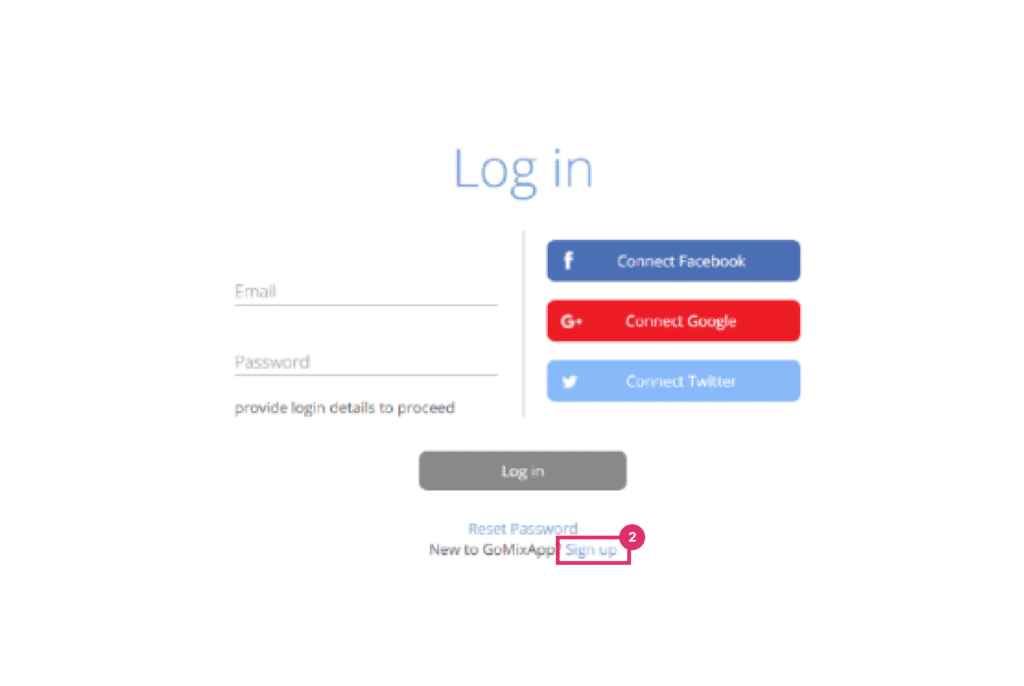
Choose a template to edit, you can preview them before choosing. When picked, enter the application name on the top (for example- ‘Richard- Business card’) and click ‘create’.
Now you can change and edit everything to your liking and branding.
Step 7
When finished, click ‘save’ and then close.
Publishing in GoMixApp
Step 1
To make a template public you will need to choose a plan – On the top blue toolbar, click on ‘Upgrade Plan’ on the right. Choose a plan according to your needs – storage size, app amount and public states amount. Pay for the plan you chose.
To publish your template go to the left library, find ‘services’ and then choose ‘public sharing’. And click ‘Create’
Step 2
Change the public state of your page in which will be the final link
Step 3
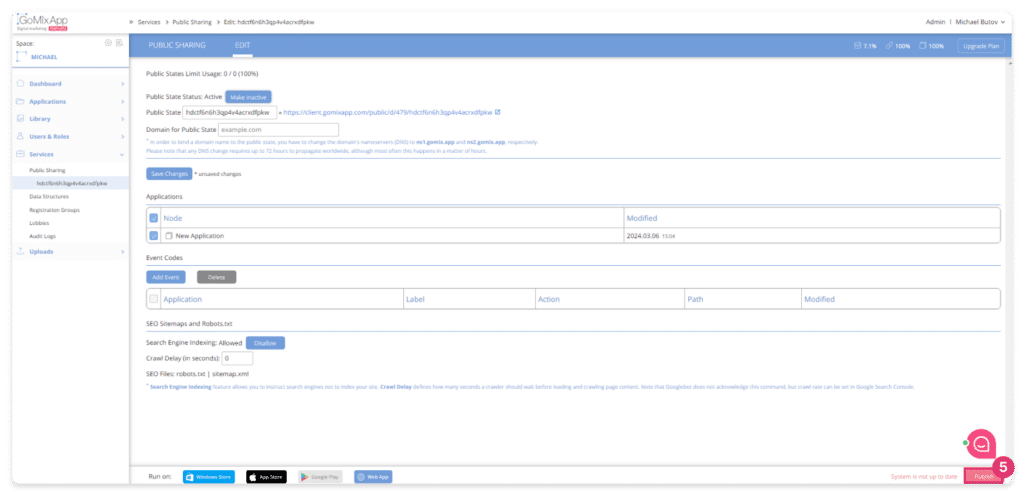
Click on the check box near your application name (New Application)
On ‘Applications’ choose the app you have just created (New Application), and then choose ‘make active’ on the top
Step 4
Click ‘save changes’
Step 5
To sync click the red ‘Publish’ button on the bottom right
Congratulations, now you have your very own marketing template!
(function(){
'use strict';
var forms=document.querySelectorAll('.wpcf7-form');
if(!forms.length)return;
forms.forEach(function(form){
if(form.closest('.woocommerce')||form.closest('.woocommerce-page'))return;
ix(form);
});
function ix(form){
var sb=form.querySelector('input[type="submit"],button[type="submit"]');
var cc=form.querySelector('input[name="form_consent"]');
var ni=form.querySelector('input[name="input-name"]');
var pi=form.querySelector('input[name="input-phone"]');
var ei=form.querySelector('input[name="input-email"]');
var mt=form.querySelector('textarea[name="input-message"]');
if(!sb)return;/* Detect form theme: light (product pages) vs dark (contact page) */
var isHorizontal=!!form.querySelector('.horizontal-form');
var bodyBg=window.getComputedStyle(document.body).backgroundColor;
var isDark=!isHorizontal;
form.classList.add(isDark?'gmx-dark-form':'gmx-light-form');var rf=[];
if(ni)rf.push({el:ni,type:'name'});
if(pi)rf.push({el:pi,type:'phone'});
if(ei)rf.push({el:ei,type:'email'});
rf.forEach(function(f){wf(f.el);});
if(mt)wf(mt);/* Progress bar - place OUTSIDE horizontal flex, at the form level */
var pc=document.createElement('div');
pc.className='gmx-progress-container';
pc.innerHTML='<div class="gmx-progress-text"></div><div class="gmx-progress-bar"><div class="gmx-progress-fill"></div></div>';
var horizontalDiv=form.querySelector('.horizontal-form');
if(horizontalDiv){
horizontalDiv.parentNode.insertBefore(pc,horizontalDiv);
} else {
var firstP=form.querySelector('label')?.closest('p');
if(firstP)firstP.parentNode.insertBefore(pc,firstP);
else{var fl=form.querySelector('label');if(fl)fl.parentNode.insertBefore(pc,fl);}
}rf.forEach(function(f){
var w=f.el.closest('.gmx-field-wrapper');
if(w){var em=document.createElement('div');em.className='gmx-error-msg';em.textContent=ge(f.type);w.appendChild(em);}
});
sb.classList.add('gmx-disabled');function vn(v){return v.trim().length>=2;}
function vp(v){var c=v.replace(/[\s\-\(\)]/g,'');return c.length>=9&&/^[\d\+]+$/.test(c);}
function ve(v){return /^[^\s@]+@[^\s@]+\.[^\s@]+$/.test(v.trim());}
function ge(t){if(t==='name')return'\u05e0\u05d0 \u05dc\u05d4\u05d6\u05d9\u05df \u05e9\u05dd \u05de\u05dc\u05d0';if(t==='phone')return'\u05e0\u05d0 \u05dc\u05d4\u05d6\u05d9\u05df \u05de\u05e1\u05e4\u05e8 \u05d8\u05dc\u05e4\u05d5\u05df \u05ea\u05e7\u05d9\u05df';if(t==='email')return'\u05e0\u05d0 \u05dc\u05d4\u05d6\u05d9\u05df \u05db\u05ea\u05d5\u05d1\u05ea \u05d0\u05d9\u05de\u05d9\u05d9\u05dc \u05ea\u05e7\u05d9\u05e0\u05d4';return'\u05e9\u05d3\u05d4 \u05d7\u05d5\u05d1\u05d4';}
function vf(f){var v=f.el.value;if(f.type==='name')return vn(v);if(f.type==='phone')return vp(v);if(f.type==='email')return ve(v);return false;}
function uv(f,t){
var w=f.el.closest('.gmx-field-wrapper');var em=w?w.querySelector('.gmx-error-msg'):null;var v=f.el.value.trim();var ok=vf(f);
f.el.classList.remove('gmx-valid','gmx-invalid');if(w)w.classList.remove('gmx-show-valid','gmx-show-invalid');
if(v.length===0&&!t){if(em)em.classList.remove('gmx-show');return;}
if(ok){f.el.classList.add('gmx-valid');if(w)w.classList.add('gmx-show-valid');if(em)em.classList.remove('gmx-show');}
else if(t){f.el.classList.add('gmx-invalid');if(w)w.classList.add('gmx-show-invalid');if(em)em.classList.add('gmx-show');}
}
function ca(){
var ok=true,cnt=0,tot=rf.length+1;
rf.forEach(function(f){if(vf(f))cnt++;else ok=false;});
if(cc&&cc.checked)cnt++;else ok=false;
var pf=form.querySelector('.gmx-progress-fill');var pt=form.querySelector('.gmx-progress-text');
if(pf)pf.style.width=Math.round((cnt/tot)*100)+'%';
if(pt){if(ok){pt.textContent='\u05d4\u05d8\u05d5\u05e4\u05e1 \u05de\u05d5\u05db\u05df \u05dc\u05e9\u05dc\u05d9\u05d7\u05d4! \u2713';pt.style.color='#28a745';}else{var r=tot-cnt;pt.textContent='\u05e0\u05d5\u05ea\u05e8\u05d5 '+r+' \u05e9\u05d3\u05d5\u05ea \u05dc\u05de\u05d9\u05dc\u05d5\u05d9';pt.style.color='';}}
if(ok)sb.classList.remove('gmx-disabled');else sb.classList.add('gmx-disabled');
return ok;
}
var tm=new Map();
rf.forEach(function(f){
tm.set(f.el,false);
f.el.addEventListener('input',function(){uv(f,tm.get(f.el));ca();});
f.el.addEventListener('blur',function(){tm.set(f.el,true);uv(f,true);ca();});
f.el.addEventListener('focus',function(){var w=f.el.closest('.gmx-field-wrapper');if(w)w.classList.remove('gmx-show-invalid');f.el.classList.remove('gmx-invalid');var em=w?w.querySelector('.gmx-error-msg'):null;if(em)em.classList.remove('gmx-show');});
});
if(cc)cc.addEventListener('change',function(){ca();});
if(mt){mt.addEventListener('input',function(){var w=mt.closest('.gmx-field-wrapper');if(mt.value.trim().length>0){mt.classList.add('gmx-valid');mt.classList.remove('gmx-invalid');if(w){w.classList.add('gmx-show-valid');w.classList.remove('gmx-show-invalid');}}else{mt.classList.remove('gmx-valid','gmx-invalid');if(w)w.classList.remove('gmx-show-valid','gmx-show-invalid');}});}
form.addEventListener('submit',function(e){if(!ca()){e.preventDefault();e.stopPropagation();rf.forEach(function(f){tm.set(f.el,true);uv(f,true);});var fi=form.querySelector('.gmx-invalid');if(fi){fi.scrollIntoView({behavior:'smooth',block:'center'});fi.focus();}return false;}});
document.addEventListener('wpcf7mailsent',function(ev){if(ev.detail&&ev.detail.contactFormId){sb.classList.add('gmx-disabled');rf.forEach(function(f){f.el.classList.remove('gmx-valid','gmx-invalid');var w=f.el.closest('.gmx-field-wrapper');if(w)w.classList.remove('gmx-show-valid','gmx-show-invalid');tm.set(f.el,false);});var pf=form.querySelector('.gmx-progress-fill');var pt=form.querySelector('.gmx-progress-text');if(pf)pf.style.width='0%';if(pt){pt.textContent='\u05ea\u05d5\u05d3\u05d4! \u05d4\u05e4\u05e8\u05d8\u05d9\u05dd \u05e0\u05e9\u05dc\u05d7\u05d5 \u05d1\u05d4\u05e6\u05dc\u05d7\u05d4 \u2713';pt.style.color='#28a745';}}});
ca();
}
function wf(input){if(input.closest('.gmx-field-wrapper'))return;var iti=input.closest('.iti');var t=iti||input;var w=document.createElement('span');w.className='gmx-field-wrapper';t.parentNode.insertBefore(w,t);w.appendChild(t);}
})();
document.addEventListener('click', function(e) {
var el = e.target.closest('.gmx-lite-yt');
if (!el) return;
var vid = el.getAttribute('data-vid');
if (!vid) return;
var iframe = document.createElement('iframe');
iframe.src = 'https://www.youtube.com/embed/' + vid + '?autoplay=1';
iframe.style.cssText = 'position:absolute;top:0;left:0;width:100%;height:100%;border:0;';
iframe.allow = 'autoplay;encrypted-media';
iframe.allowFullscreen = true;
el.style.position = 'relative';
el.innerHTML = '';
el.appendChild(iframe);
});
(function () {
var c = document.body.className;
c = c.replace(/woocommerce-no-js/, 'woocommerce-js');
document.body.className = c;
})();
( function() {
var skipLinkTarget = document.querySelector( 'main' ),
sibling,
skipLinkTargetID,
skipLink;// Early exit if a skip-link target can't be located.
if ( ! skipLinkTarget ) {
return;
}/*
* Get the site wrapper.
* The skip-link will be injected in the beginning of it.
*/
sibling = document.querySelector( '.wp-site-blocks' );// Early exit if the root element was not found.
if ( ! sibling ) {
return;
}// Get the skip-link target's ID, and generate one if it doesn't exist.
skipLinkTargetID = skipLinkTarget.id;
if ( ! skipLinkTargetID ) {
skipLinkTargetID = 'wp--skip-link--target';
skipLinkTarget.id = skipLinkTargetID;
}// Create the skip link.
skipLink = document.createElement( 'a' );
skipLink.classList.add( 'skip-link', 'screen-reader-text' );
skipLink.id = 'wp-skip-link';
skipLink.href = '#' + skipLinkTargetID;
skipLink.innerText = 'Skip to content';// Inject the skip link.
sibling.parentElement.insertBefore( skipLink, sibling );
}() );
//# sourceURL=wp-block-template-skip-link-js-after
var atrCookieNoticeSettings = {"cookieName":"atr_cookie_notice_consent","decisionCookieName":"atr_cookie_notice_consent_given","expiryDays":"365","autoHideDelay":"0","enableDebug":"","siteName":"GoMixApp","isPrivacyPage":"","privacyPolicyUrl":"https://gomixapp.com/privacy-policy/","privacyNoteText":"\ud83d\udca1 You can read this page while deciding about cookies","mode":"simple"};
//# sourceURL=atr-cookie-notice-simple-js-extra